More often than not, a lack of general project management knowledge and understanding leads to poor, or even unsuccessful project outcomes. Many people are already familiar with the Iron Triangle and have likely seen some version of it shared online.
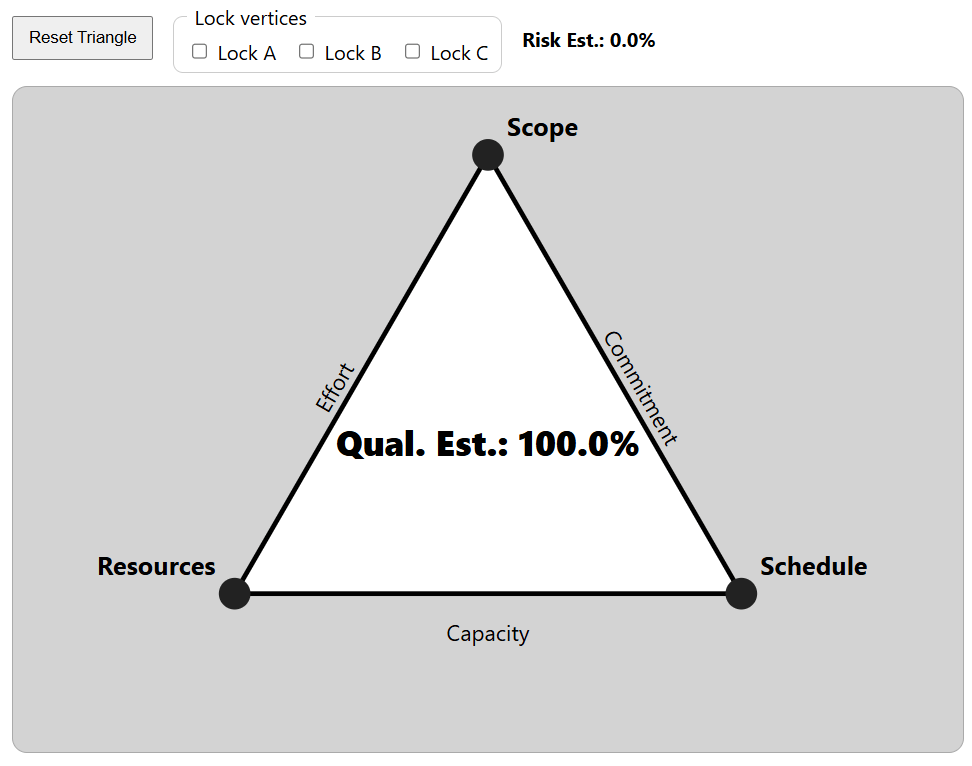
The Dynamic Project Triangle below is an attempt to help visual learners better understand the quality and risk implications of their decisions when adjusting a project’s resources, scope, and schedule. Even small changes to one side of the triangle can create significant impacts across the entire project.
I have posted the simple code for this interactive model on GitHub and will continue expanding it with additional variations over time.
This visualization is intended to help with tradeoff decisions by dynamically illustrating how modifying resources, scope, and schedule alters the balance of the system.
Interacting with the Dynamic Project Triangle
You can interact with the Dynamic Project Triangle at cainsight-app.github.io/proj-mgmt/
The model represents project constraints using a geometric triangle with vertices A, B, and C. Each vertex corresponds to a core project constraint:
– Vertex A -> Resources
– Vertex B -> Scope
– Vertex C -> Schedule
Mapping the constraints to fixed geometric labels allow the triangle to be manipulated mathematically while still representing real-world project trade-offs.
Several features allow you to simulate project trade-offs and observe their impact on quality and risk.
Vertex Adjustment
The Resources, Scope, and Schedule vertices can be dragged to simulate increases or decreases in each project constraint. Adjusting any vertex modifies the geometric balance of the triangle, representing how real-world projects shift when one constraint is changed.
Quality and Risk Indicators
As the triangle changes shape, the Quality indicator dynamically adjusts from its default value of 100%. The Risk estimate adjusts inversely to the Quality. In practical terms:
– As Quality decreases, Risk increases
– As Quality increases, Risk decreases.
This provides a visual representation of the trade-offs that occur when project constraints are modified.
Vertex Locking
Individual constraints can be fixed using the vertex lock controls. Locking a vertex prevents it from moving during adjustments, simulating scenarios where a project constraint cannot change.
– Lock A -> Resources
– Lock B -> Scope
– Lock C -> Schedule
Reset Control
The Reset Triangle button restores the model to its default equilateral configuration, representing a balanced starting point where Resources, Scope, and Schedule are proportionally aligned.
 C. Austin Insight